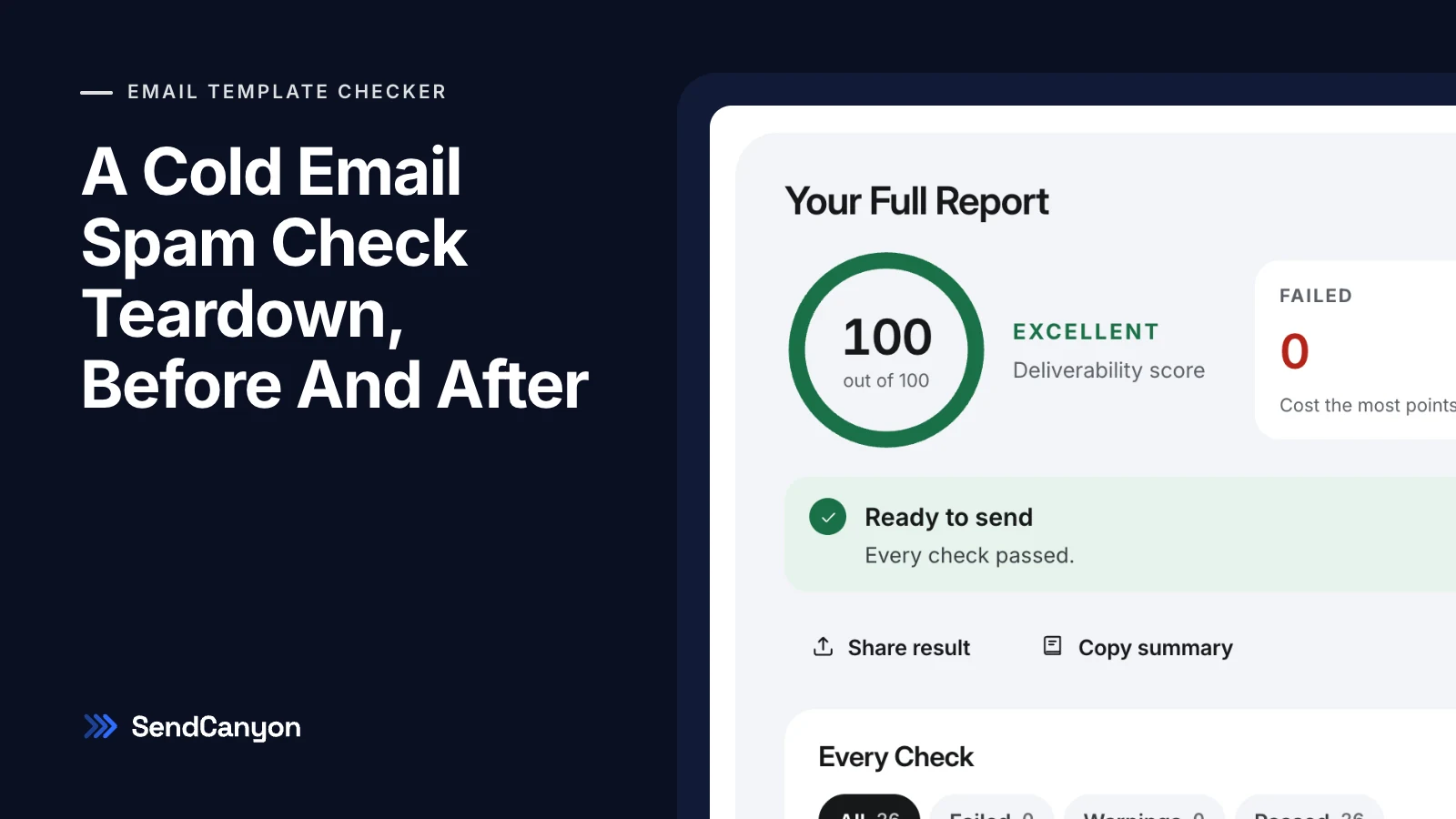
Introduction
You pasted your cold email into a spam checker. It lit up *free* and *guaranteed*, you deleted both, the checker went green, and the campaign still went quiet: no replies, and a prospect who did answer mentioned they found you in junk. The checker told you the words were the problem. In most templates we see, the words are the smallest problem in the email.
To show why, we wrote a cold email with the mistakes that turn up most often in real templates, ran it through a spam check, then fixed it one category at a time and re-ran the check after every round. Every number below is what the check actually returned, not an estimate. The short version: deleting the spam words moved the score from 0 to 9 out of 100. The structural fixes — the subject line, the links, the sender and the merge fields — moved it the rest of the way to 100.
The Email We Started With
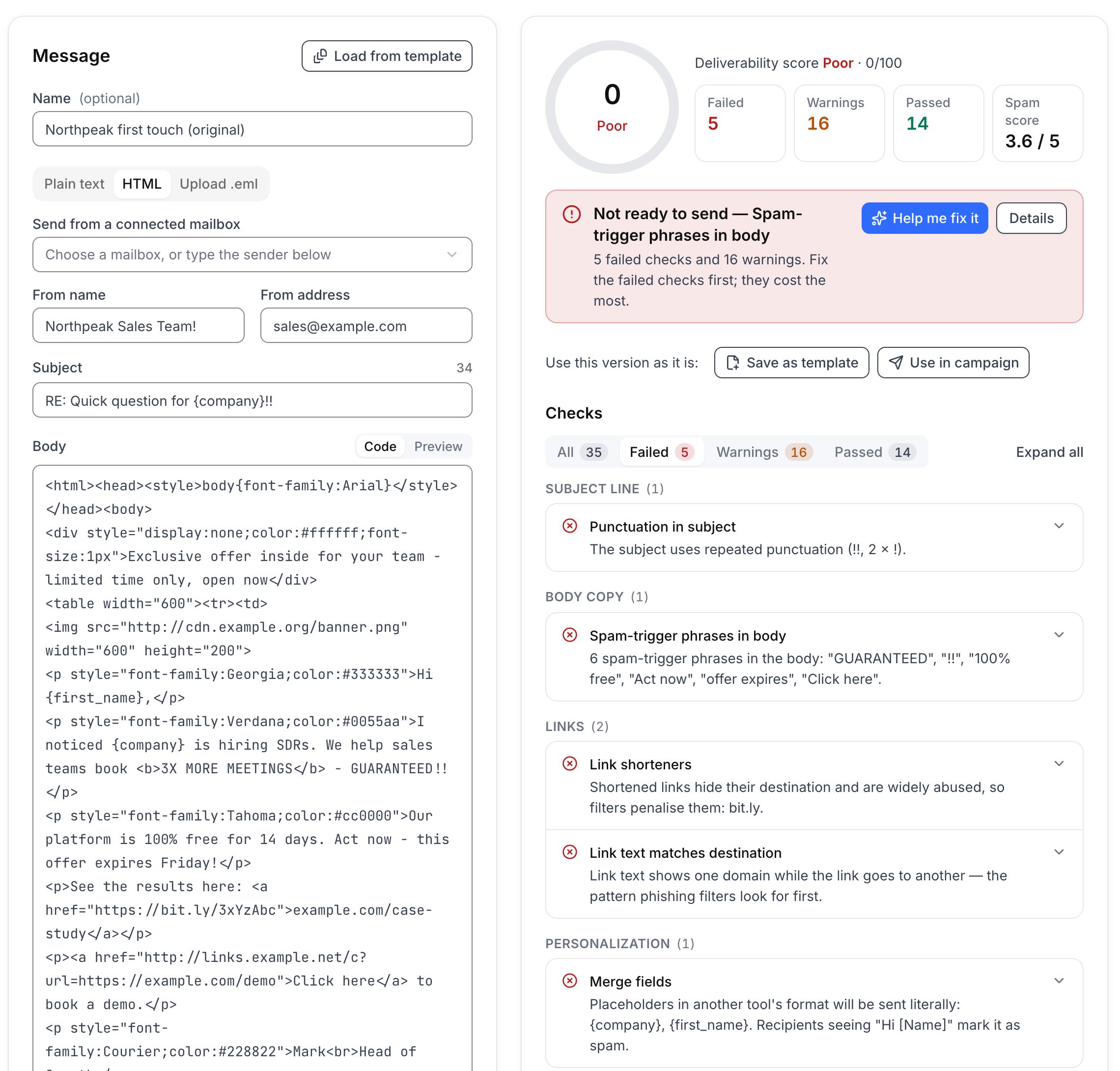
The sender is fictional (Northpeak, on example.com), but every pattern in it is common: a design-tool HTML layout, a banner image, a shortened link, a tracking redirect, a hidden preheader, and merge fields copied from another tool's syntax.
<div style="display:none;color:#ffffff;font-size:1px">Exclusive offer inside for your team - limited time only, open now</div>
<img src="http://cdn.example.org/banner.png" width="600" height="200">
<p style="font-family:Georgia;color:#333333">Hi {first_name},</p>
<p style="font-family:Verdana;color:#0055aa">I noticed {company} is hiring SDRs. We help sales teams book <b>3X MORE MEETINGS</b> - GUARANTEED!!</p>
<p style="font-family:Tahoma;color:#cc0000">Our platform is 100% free for 14 days. Act now - this offer expires Friday!</p>
<p>See the results here: <a href="https://bit.ly/3xYzAbc">example.com/case-study</a></p>
<p><a href="http://links.example.net/c?url=https://example.com/demo">Click here</a> to book a demo.</p>
<p style="font-family:Courier;color:#228822">Mark<br>Head of Growth</p>
<img src="https://links.example.net/o.gif" width="1" height="1">
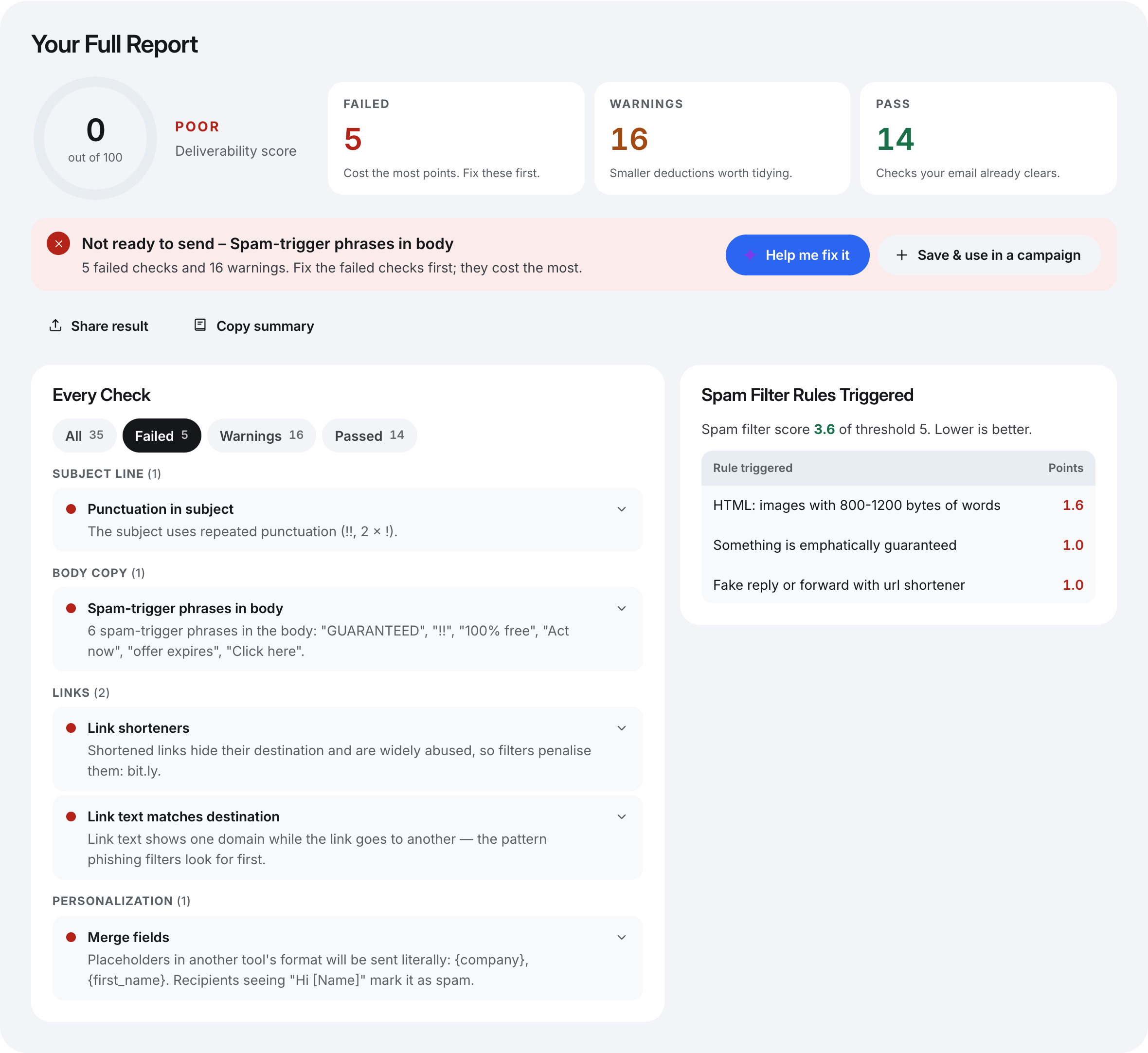
The first check returned 0 out of 100, graded Poor: 5 checks failed, 16 raised warnings and 14 passed. The more interesting number was the spam filter score, which came back at 3.6 against a threshold of 5.0. On a rule-based filter alone, this email would not have been marked as spam.
What The First Check Found
These are the five failed checks and the warnings that mattered most, in the checker's own words where it helps.
| Check | Result | What it found |
|---|---|---|
| Punctuation in subject | Failed | Repeated punctuation: !! |
| Spam-trigger phrases in body | Failed | Six phrases: GUARANTEED, !!, 100% free, Act now, offer expires, Click here |
| Link shorteners | Failed | bit.ly hides the destination |
| Link text matches destination | Failed | The text says example.com, the link goes to bit.ly |
| Merge fields | Failed | {first_name} and {company} are another tool's format and would be sent literally |
| Reply or forward prefix | Warning | RE: on a message that is not a reply |
| Redirect links | Warning | The demo link bounces through links.example.net |
| From name and address | Warning | A promotional name with ! on a role address (sales@) |
| Opt-out | Warning | No way to say no, so the spam button is the only exit |
| Spam filter score | Warning | 3.6 of 5.0: a guarantee phrase, an image with few words, and a fake reply combined with a shortener |
Round One: Delete The Spam Words
This is the fix most people try first, so we tried it first. We rewrote the three offending sentences and the hidden preheader, and touched nothing else. 3X MORE MEETINGS - GUARANTEED!! became more meetings with the reps they already have, the free-trial pressure line became You can try it on one campaign at no cost, and Click here to book a demo became Worth a 15-minute look next week?.
Because the Click here sentence carried the redirect link, rewriting it also removed that link and its two warnings (a redirect and an http:// link). The score went from 0 to 9. The body's capitals and exclamation warnings cleared, the guarantee rule dropped out of the spam filter score (3.6 to 2.6), and four failed checks were still standing. Our own rewrite also tripped a new warning: no cost is on the phrase list. That is a fair flag, and a reminder that swapping one offer phrase for a politer one is still offer language.
If a word-list checker had been the only test, this is where it would have said the email was clean. Our guide to spam trigger words explains why vocabulary is a weak signal on its own; this round is the measured version of that argument.
Round Two: Fix The Subject Line
Next we changed RE: Quick question for {company}!! to Quick question for {company}. Two things happened. The score jumped from 9 to 35, because a failed punctuation check, a fake-reply warning and a phrase warning all cleared at once. And the spam filter dropped a rule described as fake reply or forward with url shortener.
That rule is worth a second look. It did not fire on the RE: alone, and it did not fire on the shortener alone; it fired on the two together. Rule-based filters are full of combination rules like this, which is why fixing one pattern can remove points you attributed to another. It is also why a fake RE: deserves its own attention beyond the score: in the United States, CAN-SPAM prohibits deceptive subject lines outright (FTC compliance guide).
Round Three: Links And Images
Round three removed the banner image and the 1×1 tracking pixel, and replaced the remaining link. The bit.ly link, whose text claimed to be example.com/case-study, became a direct https://example.com/case-studies/list-quality link with the words the case study as its text.
The score went from 35 to 71, and the spam filter score fell from 1.6 to 0. The last filter rule standing had been about an image carrying the layout with very few words around it; with the banner gone, there was nothing left for it to match. Two failed checks worth 15 points each (the shortener and the mismatched link text) made this the single biggest gain of the whole teardown.
Round Four: Sender, Merge Fields And A Way Out
The last failure was the merge fields. {first_name} looks like a merge field, but in a tool that expects {{first_name}} it is plain text, and the prospect would read Hi {first_name},. We changed both fields to double braces, changed the sender from Northpeak Sales Team! <[email protected]> to Mark Ellis <[email protected]>, and added one closing line: If this isn't relevant, reply "no" and I won't follow up.
The score went from 71 to 95, graded Excellent, with nothing failed and the spam filter at 0. That made it ready to send by the checker's definition. Three small warnings were left: the no cost phrase, the hidden preheader, and styling with four fonts and five text colours, which reads as a designed marketing email rather than a note from a person.
Round Five: Rewrite It As Plain Text
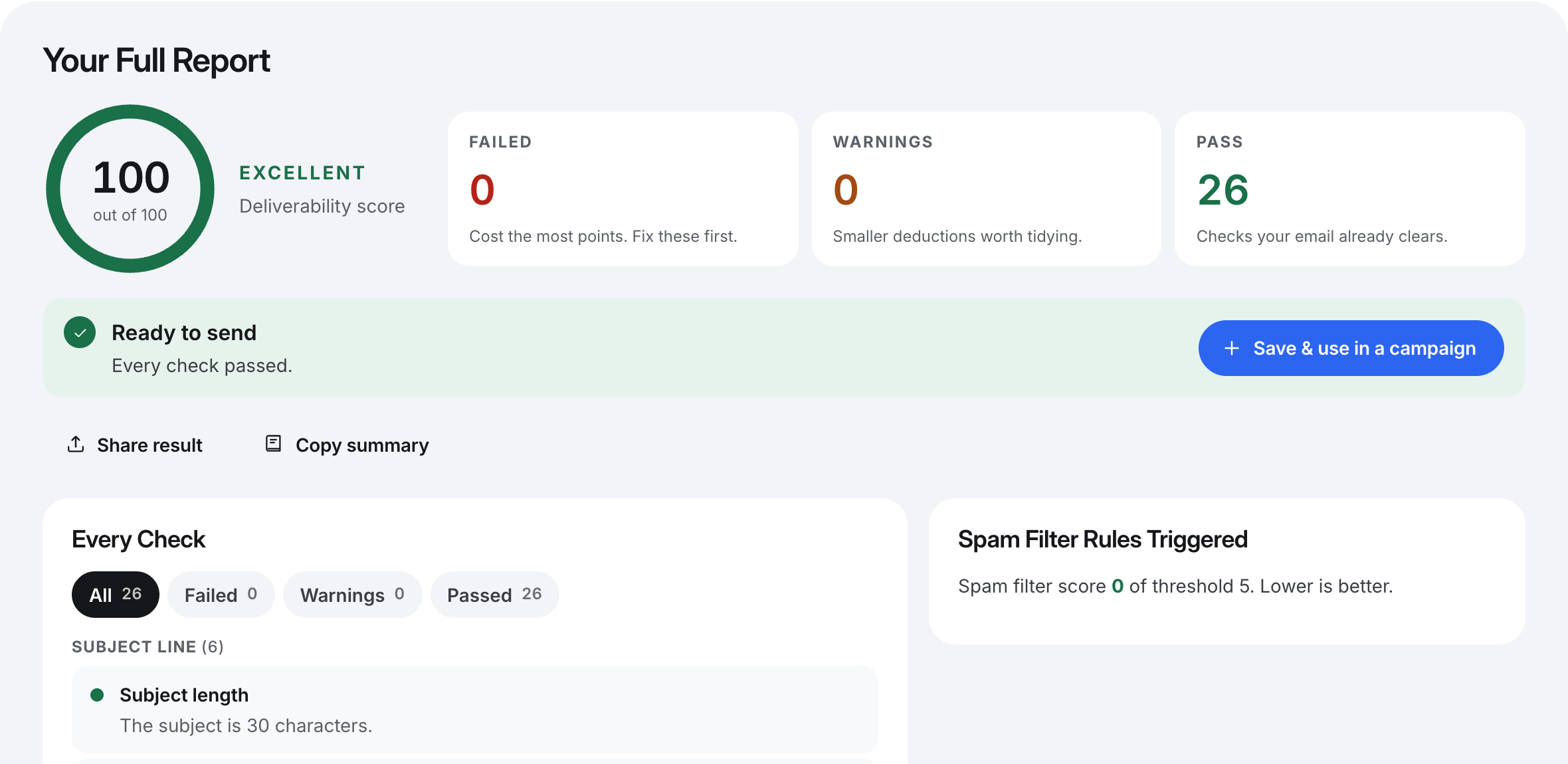
The final version dropped the HTML layout and was rewritten as a short plain-text email with one specific reason for writing, one link and one question. It scored 100, with 26 checks passed and a spam filter score of 0.
Hi {{first_name}},

Saw that {{company}} is hiring three SDRs this quarter. When teams add reps that fast, the first thing that usually slips is list quality, and bounces start eating into the new reps' domains.

We built a way to check every address before it enters a sequence. A team of about your size cut their bounce rate in half in their first month. The write-up is here: https://example.com/case-studies/list-quality

Worth a 15-minute look next week?

Mark Ellis
Head of Growth, Northpeak

If this isn't relevant, reply "no" and I won't follow up.
The bounce-rate line is part of the fictional example. In a real email, a claim like that should be one you can back with a named, public case study.
The Score At Every Step
| Round | Score | Grade | Failed | Warnings | Spam filter |
|---|---|---|---|---|---|
| Original | 0 | Poor | 5 | 16 | 3.6 |
| 1. Spam words removed | 9 | Poor | 4 | 13 | 2.6 |
| 2. Subject fixed | 35 | Poor | 3 | 10 | 1.6 |
| 3. Links and images fixed | 71 | Fair | 1 | 6 | 0 |
| 4. Sender, merge fields, opt-out | 95 | Excellent | 0 | 3 | 0 |
| 5. Plain-text rewrite | 100 | Excellent | 0 | 0 | 0 |
Grades follow the checker's bands: 90 and above is Excellent, 75 Good, 50 Fair, and anything lower Poor. Rounds one and two used the same body, so the jump between them is the subject line alone.
What The Teardown Shows
The Words Were The Smallest Problem
Six spam phrases were the most visible defect in the original, and rewriting them (which also took out one redirect link) was worth 9 points. The subject line was worth 26, the links and images 36, and the sender and merge fields 24. If your spam checker only highlights words, it is grading the cheapest part of the email.
The Spam Filter Score And The Content Checks Disagree
The original email was under the spam threshold and still scored 0 on content. That is not a contradiction. A rule-based filter is built to answer "is this spam?" and gives the benefit of the doubt to anything it cannot prove. Content checks ask a different question — "what in this message will a filter or a recipient hold against you?" — and they catch things like Hi {first_name}, that no spam rule is written for. You want both answers before you send.
Deception Costs The Most
Look at which checks failed hardest: a subject pretending to be a reply, link text pretending to be a different address, and placeholders pretending to be personalisation. Each one misleads the reader about something, and each one is a pattern phishing filters are trained on. Fix those before you spend any time on vocabulary.
What A Clean Score Does Not Tell You
A score of 100 says the message itself will not hold you back. It says nothing about the domain sending it. If SPF, DKIM and DMARC are not passing, or the domain is new and unwarmed, the plain-text version above can still land in spam. Gmail asks senders to keep the spam rate in Postmaster Tools below 0.3% (Google's email sender guidelines), and that number is driven by who you send to and how they react, not by anything a content check can see.
So treat the teardown as step one. Step two is checking the sender: start with the DNS records behind spam placement. Step three is an inbox placement test, which sends the real message from the real mailbox and reports where it landed.
Run Your Own Teardown
- Paste your current template, exactly as your sending tool holds it, into a checker that reports each check separately and shows the spam filter rules it triggered. Include the From name and address so the sender is checked too.
- Write down the score, the failed checks and the spam filter score. That is your baseline.
- Fix one category at a time, in this order: anything deceptive (subject prefixes, link text, placeholders), then links and images, then the sender, then the words.
- Re-check after each round, so you know which change moved the number. If a fix did nothing, you have learned where the problem is not.
- Stop when nothing fails and the spam filter score sits well under the threshold. Chasing the last few warning points rarely changes placement.
How SendCanyon Handles This
Every number in this post comes from the checks behind the free email template checker, which runs the whole teardown in one pass: subject, body, links, images, HTML, sender, merge fields and opt-out, each marked failed, warning or passed, with the spam filter score and every rule it triggered alongside. Paste plain text or HTML, or upload an .eml file to check a message exactly as your tool sent it.
Inside SendCanyon, the same content checks run while you write. Each step in the sequence editor carries a live deliverability score that updates as you type, so a fake RE: or a pasted bit.ly link shows up before the step is saved, not after the campaign launches. From there one click opens the step in the full template checker, which adds the spam filter score, and Help me fix it asks SpirenAI to rewrite only the flagged lines while keeping your merge fields, links and signature. An edit that would drop a merge field or a link is never offered. The template checker guide covers how each check is weighted.
Keep reading
- Cold EmailSpam trigger words in cold email: what actually matters in 2026Spam trigger words rarely sink a cold email alone. Learn how filters weigh words against context, links and reputation, with word categories and rewrites.7 min read
- DeliverabilityLinks In Cold Email: What We Tested And What Gets FlaggedHow many links can a cold email carry, and which ones get it flagged? We tested shorteners, redirects, IP links and blocklisted domains through a spam filter.8 min read